1SHOT - Endless one-shots from your sample library (VST3/AU)
Make new one-shots out of your sample library.
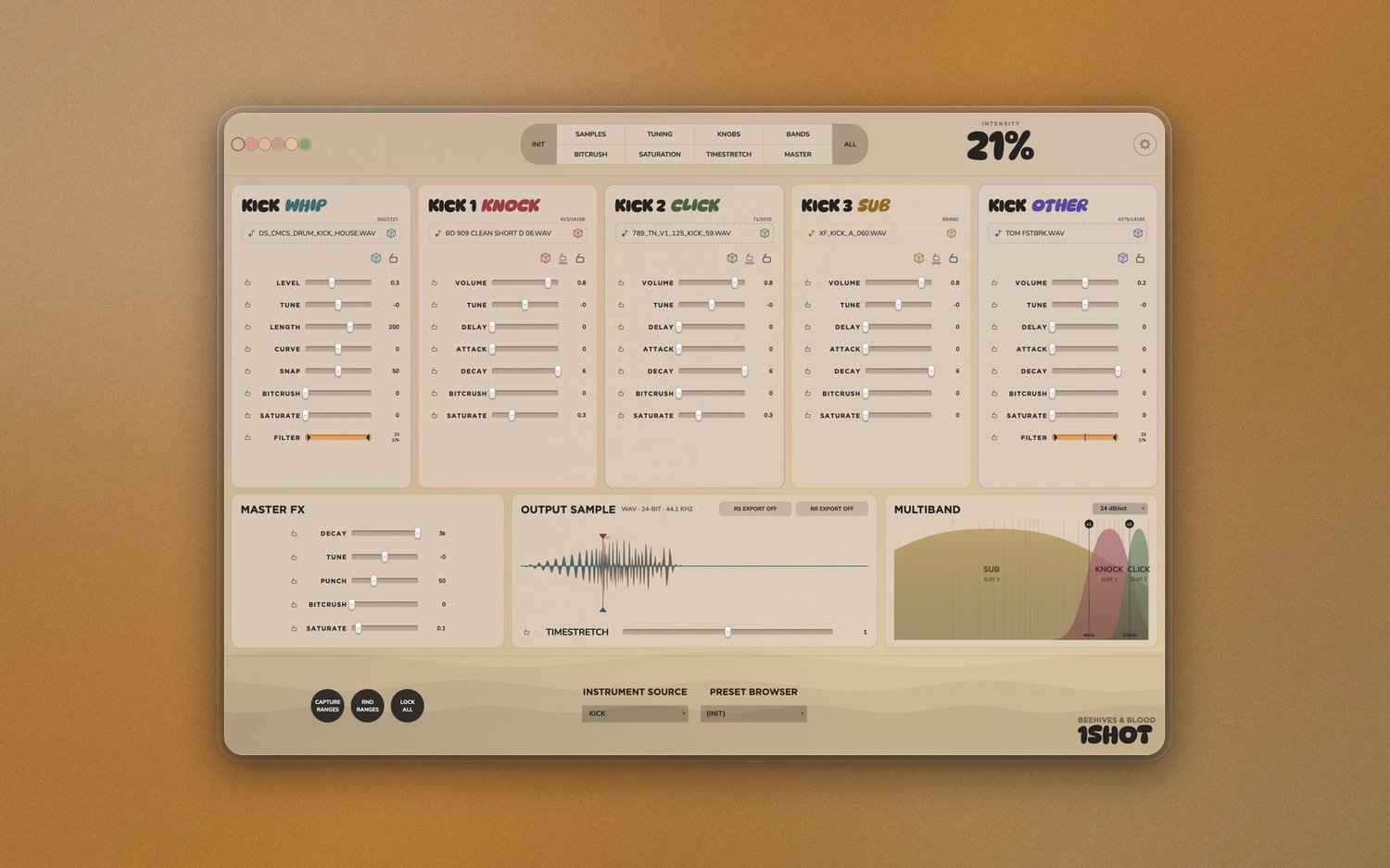
1SHOT layers five samples into one new sound. You drop a folder of one-shots on each slot, pick a type (snare, kick, etc.), and 1SHOT keeps pulling matching samples and stacking them.
Windows and macOS
VST3, AU
KEY FEATURES
Five sample slots
Slot 1 (WHIP) plays its sample in reverse. Slots 2–4 are each routed to one band of a 3-band crossover (LOW, MID, HIGH), so together they cover the spectrum without overlapping. Slot 5 (OTHER) is full-range, bypasses the crossover, and has its own bandpass filter.
Instrument source
Choose the instrument you're working on and it restricts each slot's folder to files matching the chosen type. Choose "Any" for no filter.
Per-slot controls
Each slot has a drop area for a sample or folder. If you drop a folder, its subfolders are included for randomization too. Each slot also has its own controls for shaping the loaded sound.
Randomize buttons
RND SAMPLES, KNOBS, TUNING, MASTER, BITCRUSH, SATURATION, and TIMESTRETCH each randomizes its part, scaled by the intensity setting. RND BANDS reshuffles slots 1–3 across LOW/MID/HIGH. RND ALL randomizes everything at once. INIT resets all knobs and clears the ranges.
Range bands
Every slider (slot knobs, master FX, timestretch) has a range band for randomization. Drag horizontally to move its center, vertically to set its width. CAPTURE RANGES builds range bands from the sliders' current positions. RND RANGES generates new range bands.
Presets browser
Browse, load and delete presets you've saved.
Customization
Change the background color to anything you like. Use the color picker to grab any color on your screen.
...and more.
What's new in v1.1.0
- WHIP: a fifth slot that plays its sample in reverse.
- RS (RANDOM SAMPLE) EXPORT: each click rolls and saves a fresh random hit.
- ROUND-ROBIN SETTINGS: choose what varies between round-robin takes and how much.
- CUSTOM FILE NAMES: build names from instrument, word, date, time, custom and random chips, including a random word generated for each export.
- SOLO: click a slot to solo it, right-click still mutes.
- CLICK TO IMPORT: click a slot's sample area to browse for samples or a folder, as an alternative to drag and drop.
- NUDGE: two timing handles on the waveform let you nudge the main hit or move where WHIP lands.
- FAST EXPORT: right-click the waveform to export straight to disk.
- COLOR SWATCHES: switch background colors quickly.
- DISPLAY MOTION: turn off animations.
- VERSION DISPLAY: hover over the logo to see the current version.